Partner Spotlight: An Interview with CADCIL (Niteco Zuken)
In this Partner Spotlight, we spoke with Mr. Tanaka, President and CEO of NITECO ZUKEN Co., Ltd., the company behind CADCIL, a CAD training school operated by an engineering drafting firm.
7-6-2026
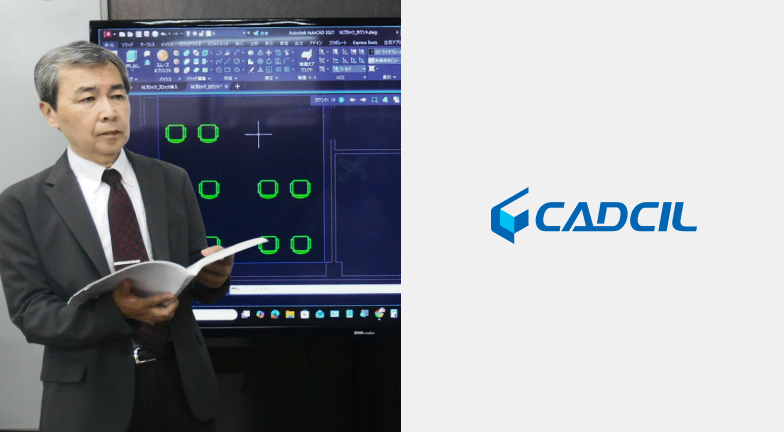
Interview with CADCIL (NITECO ZUKEN): Practical CAD Training and Their Evaluation of BricsCAD
We spoke with NITECO ZUKEN, a company that not only provides CAD drafting services but also delivers professional BricsCAD training. In this interview, they share their initiatives, training philosophy, and practical evaluation of BricsCAD from the perspective of experienced CAD instructors.
Thank you for visiting the BricsCAD office in Yokohama Minato Mirai today. I thought your company was based in Osaka. Are you in Tokyo for on-site training?
Yes. We receive training requests from all over Japan, so business travel is a regular part of our work.
Photo provided by NITECO ZUKEN Co., Ltd.
We understand that your company originally started as a drafting service business. Could you tell us how the training business began?
After graduating from university, I started my career at a design company. At that time, CAD was not yet widely used, so drawings were created manually.
Later, wanting to gain more hands-on experience, I joined a machinery manufacturer where I worked in production engineering and technical management. That was where I first encountered CAD, specifically CADPAC.
After about five years, I became independent. Since it was difficult to rely solely on contracted drafting work at the beginning, I started teaching AutoCAD. Although my experience had been limited to CADPAC, I taught myself AutoCAD and became an instructor.
Over time, I taught at several training schools while also receiving drafting assignments from my former employer. As a result, I developed the business around two pillars: CAD training and drafting services.
The company was founded in 1990, and some of our clients from the early days are still with us today.
When did the training business really take off?
Initially, we didn't actively expand as a training school; we simply listed our services on our website.
The turning point came when Autodesk approached us about becoming an Authorized Training Center. After obtaining certification and being listed on Autodesk's official directory, our visibility increased significantly and more students began enrolling.
About ten years ago, we formally branded our training services as CADCIL.
How We Started Offering BricsCAD Training
When did you begin providing BricsCAD training?
Quite recently.
One of our former AutoCAD training clients migrated to BricsCAD and asked us to provide introductory training. That request became the catalyst for offering BricsCAD training.
In fact, this current business trip is also for a BricsCAD implementation training program.
Photo provided by NITECO ZUKEN Co., Ltd.
What was your first impression when using BricsCAD?
Before then, I had never used it.
However, I had heard that BricsCAD offers a high level of compatibility with AutoCAD, so I downloaded the trial version and tested it myself.
My impression was very positive—I was able to understand the software almost immediately.
I create all training materials in-house, and most of my AutoCAD training content could be reused. The main adjustment was simply replacing the screenshots.
From an instructor's perspective, did anything feel unfamiliar?
Not really.
The overall usability felt very similar to AutoCAD.
That said, some interfaces for configuring settings—such as dimension styles and other system settings—are different from AutoCAD, so users may need a little time to become familiar with them.
Services and Key Strengths
What types of companies typically request your training services?
For 2D CAD training, most of our clients come from the construction and civil engineering sectors.
For 3D CAD training, the majority come from the manufacturing and machinery industries. We primarily support Autodesk products such as Fusion and Inventor.
We receive many requests for BricsCAD 3D training. Since you already provide AutoCAD 3D training, do you think BricsCAD 3D training would also be possible for your company?
Yes, probably! (laughs)
I think it would be feasible, and we would certainly like to consider offering it.
Do you also provide online training? Do you have standard curricula?
Yes, we offer online training as well.
However, especially for beginners, we strongly recommend face-to-face training. When participants are new to CAD, online courses can make it difficult to gauge engagement and understanding, sometimes reducing the effectiveness of the training.
Photo provided by NITECO ZUKEN Co., Ltd.
Regarding curricula, we customize the content for every client. We also provide highly tailored sessions based on specific requests, such as:
"Please teach us only these functions."
"Help us solve this workflow problem."
"Show us how to improve productivity in our actual projects."
Since most of your training has traditionally focused on AutoCAD, do you notice any differences with BricsCAD?
One major difference is the licensing model.
Most AutoCAD users work with subscription licenses, which means they are typically running the latest version. Therefore, our AutoCAD training generally uses the latest release.
With BricsCAD, however, many companies continue using earlier versions such as V23. As a result, we cannot always train using the newest version. For our current project, for example, we have downloaded an older version specifically to match the client's environment.
(BricsCAD Comment)
That's largely because BricsCAD offers perpetual licenses. Another characteristic of BricsCAD is its flexibility for customization. Many companies have heavily customized their environments and therefore continue using older versions.
Another point is that the installation process is extremely simple.
With many CAD products, users must log into a customer portal and navigate several steps before downloading. BricsCAD can be installed directly from the website, and activation is completed simply by entering a license key. For new users, that ease of deployment can be a significant advantage.
I also appreciated the highly customizable interface. The ability to arrange various panels and display options according to user preference is very convenient.
And one feature that impressed me was the Guide Move command. Being able to place selected objects—such as valves—along guide lines is incredibly useful.
(BricsCAD Comment)
Thank you. Guide Move has existed for some time, but it has become even more powerful in recent releases. We're delighted that you found it useful.
What Makes CADCIL Different?
We understand that your services go beyond standard CAD training. We have heard that you offer drawing reviews and advanced training even for experienced users. Could you tell us more?
Our greatest strength is practical instruction based on real-world experience.
Many training schools focus primarily on explaining software functions and commands. We take a different approach by teaching from an operational perspective.
When we review actual drawings and ask, "Why is this drawing necessary?" we sometimes find that there is no clear answer. In some cases, users spend excessive time creating unnecessary section views or detail drawings.
As a result, we help clients improve workflows and reduce drafting time. We often introduce more efficient methods to replace practices that people have been performing the same way for years.
A common reaction from participants is:
"I never knew there was a better way to do that."
Our value lies not only in software training but also in business process improvement and consulting.
Do you have any advice for becoming proficient in CAD?
Even today, I occasionally receive requests to teach software I have never used before. That means I constantly have to learn new systems and deepen my understanding of various industries.
In some cases, I even obtain industry-specific certifications to better understand our clients' businesses. For example, I earned a Boiler Engineer qualification last year.
Ultimately, though, experience is the key.
There are no shortcuts—you simply need to put in the time and practice.
Finally, do you have a message for our readers?
At CADCIL, our goal is not merely to teach CAD functions.
Because we have extensive experience creating actual engineering drawings, we are able to provide training that reflects real-world business requirements.
Through practical CAD education, we aim to make a meaningful contribution to industry and society.
Contact Information
If you want to develop practical CAD skills rather than simply learn commands, or if your company is looking for customized training tailored to your workflows and challenges, CADCIL may be the right partner for you.
CADCIL
https://www.cadcil.jp/
4F Hanahara No.3 Building
4-13-24 Nishinakajima, Yodogawa-ku
Osaka 532-0011, Japan
Tel: +81-6-6303-0303
Operating Company: NITECO ZUKEN Co., Ltd.
https://www.niteco.jp/