A lot of time spent working in CAD goes toward the smaller tasks that surround the design work. Importing files, managing complex drawings and preparing documentation are all necessary parts of the process. When those tasks take less time, it can make for a meaningful difference.
Octave BricsCAD V27 makes these everyday workflows more efficient—even more so than V26. The results are measurable, from IFC imports that are 10 times faster to dimensioning tasks that require 75% fewer clicks. Here's a closer look at where those improvements make a difference.
Open and connect: Get to work faster
Before you can begin working on a model, you often need to bring together information from different sources. Depending on the size and complexity of those files, that first step can take longer than you'd like.
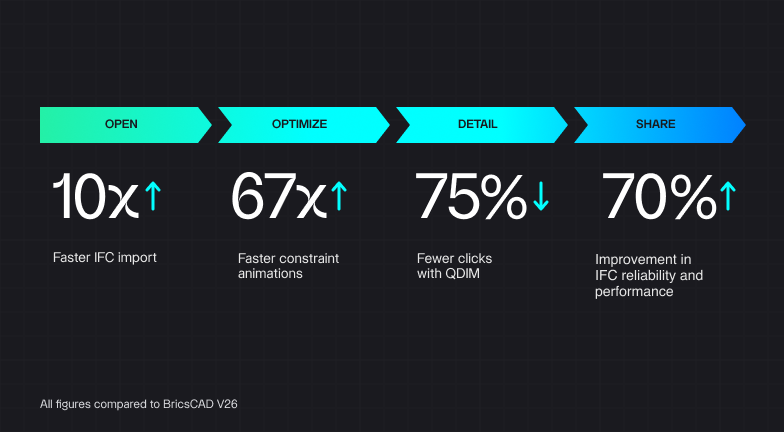
BricsCAD V27 significantly reduces that waiting time. IFC imports are now 10 times faster, while FBX imports take half as long as they did in V26. For teams exchanging building models or bringing visualization data into their projects, these improvements make it easier to get started.
There's also good news for survey professionals working with large datasets. Point-cloud file sizes can be reduced by 80%, making them easier to store and manage. Meanwhile, survey data mapping tasks that previously took hours can now be completed in less than a minute.
Optimize and organize: More responsive CAD workflows
Once a drawing is open, the way the software responds to your commands can have a considerable effect on how smoothly you work. Even a short delay becomes noticeable when you encounter it repeatedly throughout the day.
In BricsCAD V27, constraint animations are 67 times faster than in V26. For users working with parametric designs, this means less time waiting to see how constrained geometry responds to changes.
Compatibility with dynamic blocks has also improved by a factor of 10. This is particularly relevant for teams working with DWG files from different CAD applications, where reliable handling of existing drawing content is essential.
V27 also delivers a fivefold improvement in focus switching between the command line and drawing area.
Detail and annotate: Fewer actions, faster results
Detailing and annotating drawings involves plenty of small, repetitive actions. Selecting geometry, preparing section views and applying dimensions are familiar tasks, but the number of interactions required can add up quickly.
One of the most striking improvements in BricsCAD V27 is to Quick Dimension (QDIM), which now requires 75% fewer clicks when dimensioning large drawings. For anyone regularly preparing technical documentation, that's a meaningful reduction in manual work.
Other improvements make the detailing process more efficient. Gesture selection is now 1.5 times faster, while section detailing workflows are three times more efficient than in V26.
None of these changes requires a different approach to producing drawings. They simply (and crucially) reduce the effort involved in the tasks CAD professionals regularly perform.
Create and share: Better interoperability, fewer barriers
CAD drawings and models rarely stay within a single application. They move between project partners, departments and disciplines, often passing through several software environments before a project is complete. That's why interoperability remains an important part of BricsCAD development.
With V27, STEP and IGES import capabilities are included in BricsCAD Pro, giving users more flexibility when working with 3D models from other systems. Mechanical translation capabilities are also included in BricsCAD Mechanical and Ultimate, supporting data exchange across engineering workflows.
For BIM teams, IFC reliability and performance have improved by 70%, helping make the exchange of building model information more dependable.
There's a financial benefit, too. With STEP and IGES capabilities included in BricsCAD Pro, users can access these workflows at a price point 47% lower than the comparable AutoCAD offering.
What the numbers tell us about BricsCAD V27
When a software release arrives, it's normal to focus on the major new features But improvements to existing tools and everyday interactions can have just as much influence on the way you work. And it's an important part of the V27 story.
Faster imports mean projects can get underway sooner. More responsive tools make complex drawings easier to work with. And reducing the number of actions required for routine tasks leaves more time for the work that needs your attention. Taken together, these improvements show how BricsCAD V27 builds on familiar workflows while making them more efficient.
Explore the new and enhanced features in BricsCAD V27 to see what else is included in the latest release.
*All performance figures are compared with BricsCAD V26.